Integration guide
ID Card Middleware - Sandbox Integration Guide
Overview
TRIDENT Card ID Integration enables web applications to securely access information stored in electronic identity cards through a browser-based integration model.
The solution is built on top of the TRIDENT Middleware component, which acts as a secure bridge between web applications and local smart card readers connected to the user's workstation.
Using this integration, applications can retrieve information from supported electronic identity cards without requiring browser-specific technologies such as Java Applets or ActiveX controls.
Communication between the web application and the local service is performed using Secure WebSockets (WSS), providing a secure and modern integration approach compatible with current web browsers.
Key Features
Browser-independent integration model
Secure communication using TLS-protected WebSockets
Smart card reader detection
Electronic identity card detection
Personal information retrieval
Cardholder image retrieval
Digitally signed responses for authenticity verification
Support for Windows and Linux environments
JavaScript-based integration API
High-Level Architecture
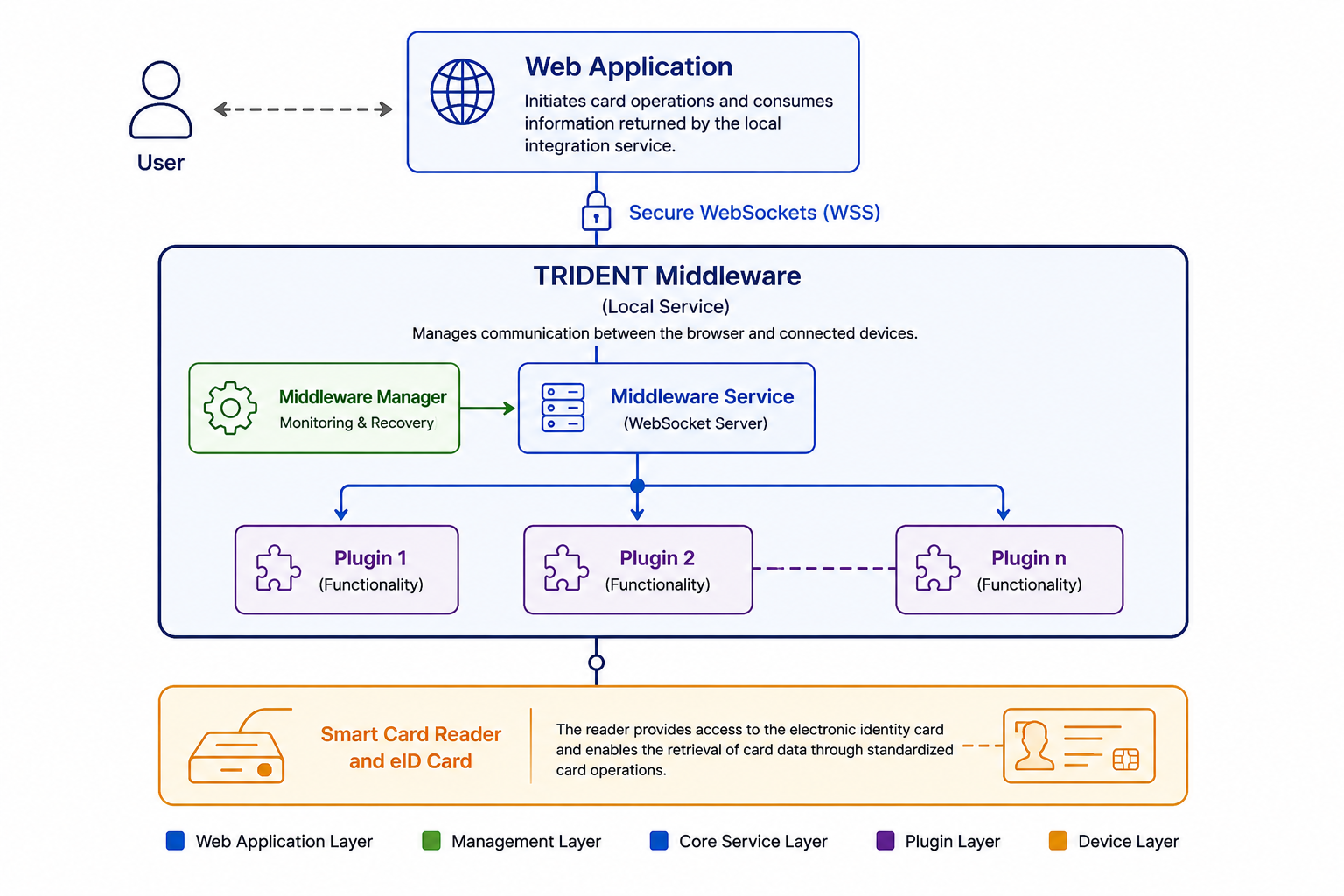
The solution consists of three main components:
Web Application
The web application initiates card operations and consumes the information returned by the local integration service.
Trident Middleware
A local service installed on the user's workstation that manages communication between the browser and connected devices.
Smart Card Reader and eID Card
The reader provides access to the electronic identity card and enables the retrieval of card data through standardized card operations.
All communication between the browser and TRIDENT Middleware is performed locally using Secure WebSockets.
Typical Integration Flow
A typical card-reading process follows these steps:
The user accesses the web application.
The application establishes communication with TRIDENT Middleware.
The application verifies that a compatible smart card reader is available.
The user inserts the electronic identity card.
The application requests the desired card operation.
TRIDENT Middleware retrieves the requested information from the card.
The response is digitally signed by TRIDENT Middleware.
The application validates the response signature.
The retrieved information is processed by the application.
Available Operations
The platform provides a set of operations that can be used to interact with supported electronic identity cards.
Card Detection
Detect available smart card readers and verify that a card has been inserted.
Chip Identification
Retrieve the unique chip identifier associated with the card.
Personal Information Retrieval
Read personal information stored on the card, such as identity details and demographic information.
Cardholder Image Retrieval
Retrieve the facial image stored on the card.
Complete Data Retrieval
Obtain all available information from the card through a single operation.
Response Security
To ensure authenticity and integrity, responses returned by TRIDENT Middleware may include a digitally signed challenge.
Applications can validate this signature using the certificate included in the response, ensuring that:
The response was generated by a trusted TRIDENT Middleware instance.
The information was not modified after being generated.
The communication process remains verifiable and auditable.
Supported Platforms
Operating Systems
Microsoft Windows
Linux (supported distributions)
macOS (Launching soon)
Browsers
Internet Explorer 11+
Microsoft Edge 14+
Google Chrome 49+
Mozilla Firefox 51+
Getting Started
To begin integrating with TRIDENT Card ID:
Install TRIDENT Middleware Hub on the target workstation.
Verify that the required certificates are installed.
Connect a supported smart card reader.
Include the JavaScript integration library in your application.
Implement the required card operations.
Validate response signatures.
Technical Documentation
Detailed technical documentation is available for developers and integrators and includes:
Installation Guide
JavaScript API Reference
Supported Operations
Request and Response Examples
Response Signing and Validation
Error Codes and Troubleshooting
Certificate Management Procedures
Download the complete Integration Guide for implementation details and code examples.